


LinkedIn is an extremely effective marketing tool for every business, particularly in the B2B market. B2B marketers see it as a valuable source of quality leads, for interacting with peers, and for establishing professional networks.
A solid presence on LinkedIn gives your company a professional digital footprint, as well as the opportunity for your brand to be noticed by millions of LinkedIn users and businesses. Understanding how to create a LinkedIn profile that represents your brand effectively is essential to this visibility.
One of the key components of building your brand’s presence on LinkedIn is to create a LinkedIn Business Page. This page allows your business to showcase products or services, provide valuable industry insights, and attract new clients.
If you are new to LinkedIn or want to enhance your existing profile, this guide will lead you through the steps to create an appealing profile that stands out and meets your business goals.
Why a Strong LinkedIn Profile Matters
When asked what LinkedIn is all about, people typically respond with words like:
- Personal branding
- Company branding
- Trust-building
- Networking
- Job search
- Lead generation
- Professional networks
This is accurate. LinkedIn is the most trustworthy social network, making it the best platform for professional content and discovering new opportunities.
Although many people have a LinkedIn profile, not everyone uses it effectively to promote their B2B company or themselves. Professionals are on LinkedIn, a community you should be part of if you wish to grow your career or expand your B2B business.
Download Our FREE LinkedIn Post Templates Toolkit Here →
Tips on Creating a LinkedIn Profile
Set Up the Basics: Photo, Banner, and Core Details
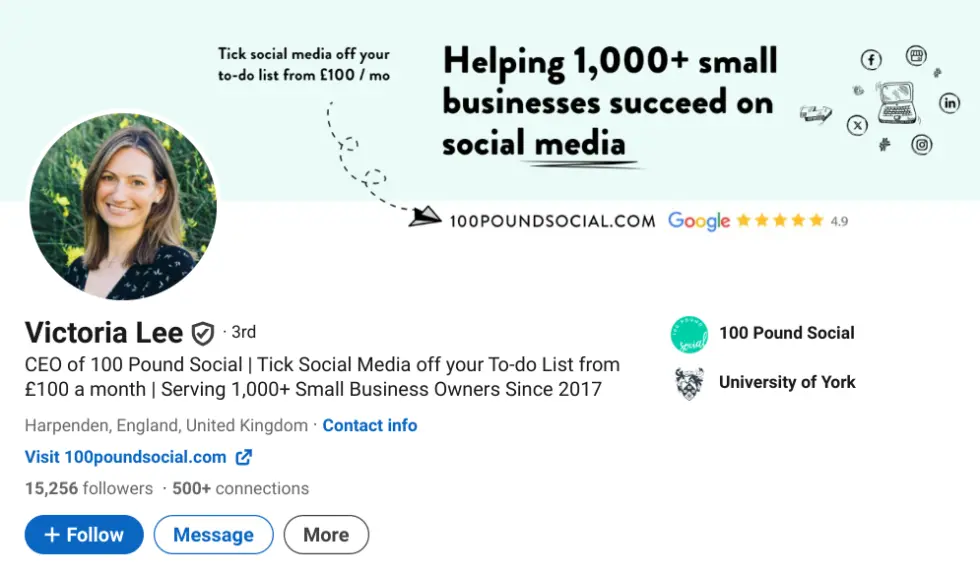
Your LinkedIn profile photo is your first impression to potential recruiters and contacts. When creating a LinkedIn profile, using a professionally designed, high-quality headshot will significantly increase your profile views. When choosing your picture:
- Use a clear, high-resolution image.
- Dress appropriately and ensure adequate lighting.
- Be confident, display some personality, and smile.
When creating a profile, and learning how to create a LinkedIn profile, ensure the email address you use is one you check regularly. This is crucial for receiving messages, connection requests, and notifications.
Include basic details about your demographics, such as location. Upload a professionally designed banner to make a lasting impression.
It is also important to provide core details, such as a phone number. The more ways a potential client can contact you, the better. You can also begin making connections at this initial stage by allowing LinkedIn to access your email contact list.
Create a Compelling Headline
You have 120 characters to write an engaging headline that demonstrates who you are to your contacts. Your headline is often the only thing people see when you comment on others’ posts.
Your headline should be relevant to the role you seek. Include:
- Who you are
- What you do
- Who you aspire to be
Create a headline that attracts the type of client you want to work with. This will encourage them to view your full profile or connect with you on LinkedIn.

Write an Engaging About/Summary Section
Your LinkedIn profile allows others to learn more about you once they’ve read your headline. A strong summary can attract potential clients or partners who are looking for trustworthy, capable businesses to work with.
Your summary should:
- Share your story
- Showcase your passion for areas of interest
- Outline your objectives
Guidelines to follow:
✅ Write in the first person (use “I” instead of “he” or “she”)
✅ Use phrases that demonstrate your expertise
✅ Include relevant keywords
✅ End with a call-to-action, such as “Email me at [insert email address]” to invite contact
This section should clearly inform people how to reach you and encourage engagement.
Optimise Your Experience Section
Your experience section should go beyond listing job titles and dates. Include:
- Concise descriptions of your services/products
- Key accomplishments for each role
- Bullet points to improve readability
- Quantified achievements when possible (e.g., “Increased sales by 25% within six months”)
You can also include images or links to showcase your work.
Showcase Skills, Expertise, and Accomplishments
LinkedIn allows you to post up to 100 skills. When creating a LinkedIn profile, include a mix of soft and technical skills relevant to your industry. Place the most important skills first so they are easily visible to prospective clients.
You may also request endorsements from previous or current clients to enhance credibility.
Improve Your Profile with Recommendations
When learning how to create a LinkedIn profile effectively, aim for at least three recommendations to help strengthen your overall credibility.
Recommendations should reflect a variety of working relationships. They can be requested through LinkedIn’s form, and your connections will send the recommendation via their personal account, which you must accept before it appears on your profile.
You can also upload media or documents, such as reference letters or portfolio samples, in the Experience or Summary sections.
Let Us Take Social Media Off Your Plate From Just £100/mo →
Optimise Your Profile for Search (LinkedIn SEO)
If you are familiar with digital marketing, you understand the importance of keywords in SEO. This principle also applies to LinkedIn.
To optimise your profile:
- Use terms people are likely to search for when looking for your services or expertise.
- For example, if you are running a digital marketing agency, include phrases like “B2B marketing” or “B2B Social Media Strategy” in your job title. In your description, use relevant phrases such as “Lead Generation” and variations.
- Avoid keyword stuffing; only include terms that are relevant and natural.
Additionally, link your LinkedIn profile to your personal website if it is a domain authority (DA) site to improve visibility.
Use the Featured Section to Highlight Key Work
The Featured section allows you to showcase:
- Posts
- Newsletters
- Articles
- Links or other media
Use this section to highlight your most relevant expertise and accomplishments. Include examples of your work, links, and articles that demonstrate your skills and knowledge.
Stay Active: Posting and Engaging on LinkedIn
We recommend engaging on LinkedIn at least three times per week. Activities include:
- Posting relevant content
- Liking or commenting on others’ posts
- Writing your own posts
Regular engagement helps you build rapport with other professionals, showcase your skills, and share insights on relevant subjects, new ideas, and best practices.
The best methods to remain connected on LinkedIn include:
- Keep your profile updated regularly
- Maintain quality connections
- Share content consistently
- Participate in group discussions
- Engage with your connections
Final Checks and Ongoing Optimisation
Don’t let your profile remain idle for long. In addition to publishing new content and engaging with contacts, it is essential to update your profile regularly with:
- New information about your services/products
- Skills you have recently acquired
- Completed projects or achievements
Regular updates signal consistency and growth, which is highly valued by potential partners or clients.
Wrap Up
A LinkedIn profile can be one of the most effective ways to establish trust and credibility with your audience. Google searches for individuals’ names often prioritise LinkedIn profiles at the top of search results, highlighting the platform’s significance.
Use these LinkedIn profile suggestions and examples to learn how to create a LinkedIn profile that impresses. After completing the basic set-up, review popular LinkedIn hashtags that you can incorporate into your posts and profile to maximise engagement.
Next Steps
Creating a standout LinkedIn profile is about positioning yourself strategically and showcasing your value.
Since 2017, we’ve helped over 1,000 business owners across diverse industries develop effective social media strategies that drive real client acquisition results.
Our clients consistently report increased turnover, growing social media followings that convert to business enquiries, and most importantly, signing new clients through their improved online presence.
Ready to transform your social media from a time drain into a client-generating asset?
Join a free 15-minute demo to discover how we can create expert content for your business from just £100 per month. Our comprehensive approach is focused on client attraction, content creation that resonates with potential clients, and performance optimisation—everything you need to turn your audit findings into sustainable business growth.
Book your demo today and let us show you how professional social media management can accelerate your success at attracting new clients, while giving you back valuable time to focus on serving your existing clients and growing your business.