

Scheduling posts on Instagram can help small-scale businesses maintain a consistent presence on the internet. By organising and automating your Instagram posts, you can make sure that your posts reach your target audience in the most effective way.
This article will walk you through how you can schedule posts on Instagram, including the official application Meta Business Suite and a popular tool, like HeyOcra, which will allow you to focus on the parts of your business.
While using Instagram itself is great for scheduling one post at a time, third-party tools simplify the process and offer additional functions. We’ll also cover the benefits of scheduling in this blog.
What Post Scheduling Means
Scheduling isn’t just a convenient feature. It’s a method of ensuring consistency.
Here are some useful statistics to show why you need to have a schedule workflow:
- Instagram’s scheduling limits: Instagram allows scheduling up to 25 posts (Feed, Reels) per day, with a maximum of 75 days in advance, requiring a professional (business or creator) account.
- Instagram’s size: Latest studies show that Instagram has 1.74 billion users across the world, so odds are your ideal clients are on there.
- Timing can still play a role (even when it’s not all that important): the best times to post are Tuesday through Thursday between 9 a.m. and 3 p.m., with Wednesday at 11 a.m. to 1 p.m. often being the highest-performing slot.
- Reels: This video format can achieve up to 37.87% higher reach than other types but needs more work to create.
A key thing to remember is that you’re competing against a busy feed. Scheduling allows you to show up regularly and post at the times when your readers are most likely to be responsive.
Let Us Take Social Media Off Your Plate, From Just £100/mo →
The Reasons to Schedule in 2026
If you’re posting daily content by hand, you risk slipping behind and that’s not good for your online social media profile or your business.
Here’s the reason why planning the timing of your Instagram post is vital this year.
Consistency Is Key
The Instagram algorithm favours regularity. It rewards accounts that consistently post and keep their followers active.
If you post regularly, the algorithm recognises that your profile is active and will promote it to a new audience.
This helps increase the visibility of your company and allows you to reach out to a larger target audience.
Stop Guessing, Start Growing
Are you always online? Your audience isn’t either. There are certain times when they’re most engaged and eager to interact with your message.
Scheduling tools reduce uncertainties by using data to determine your ideal posting times.
If you plan your post to go live at a time when your audience is most likely to be viewing it, you significantly improve your chances of gaining more comments, likes and shares.
Create Better Content
If you’re trying to get everything done at once, you risk making a mistake with your quality, and Instagram isn’t happy about that!
Scheduling lets you batch your content creation and also helps ensure that your content is error-free. No more missing captions or typos in your posts.
Make sure to set aside a certain amount of time each week to plan, design and then write your posts.
Save Time and Beat Burnout
The scheduling of your posts relieves you from the burden of deciding on what post to write next time. By planning ahead, you will be able to make time for your day-to-day client work.
You have limited time in your working day and it’s key to focus on things that really need your attention. It could be a new product launch or maybe you’ll even have the chance to enjoy a much-needed break!
Scheduling is the most effective way to avoid burnout from social media because it allows you to remain at the top of your game without getting overwhelmed.
Steps For Scheduling Posts In The Official App
Users are able to plan as many as 25 postings per day, and for up to 75 calendar days.
Remember that it is only Instagram Business and Creator accounts are able to use this feature. Personal accounts aren’t able to.
These steps will help you begin:
Step 1: Open Instagram and tap the plus (+) icon at the bottom. You can also just swipe left on your home feed.
Step 2: Select Post or Reel based on what you’re uploading.
Step 3: Choose your media. This is where you need to check your aspect ratio. Even though vertical content is popular, many creators still stick with the classic Square (1:1) at 1080 x 1080 pixels.
If you aren’t using a square, Instagram is quite picky:
- For Portraits: Your ratio needs to stay between 4:5 and 0.99 (think 1080 x 1350).
- For Landscapes: Keep it between 1.01 and 1.91.
- For Reels: Always aim for 9:16 to fill the whole screen. Make sure your image or video fits these numbers so the app doesn’t awkwardly crop your work.
Step 4: Add your filters, stickers, or music, and write out your caption.
Step 5: Scroll down and hit Advanced Settings.
Step 6: Flip the Schedule and switch to “on.” Select your specific date and time from the menu.
Step 7: Go back and tap Schedule. You’re officially on the calendar!
Get Our FREE Social Media Plan →
Schedule Posts With Meta Business Suite
While you can technically use Meta’s own Business Suite to get your content live, it often feels a bit clunky and limited for those trying to scale. It involves jumping back and forth between your Facebook and Instagram connections, which can be a headache when you’re busy.
We find that relying solely on native tools makes it much harder to visualise your overall strategy. That is exactly why we lean on HeyOrca to handle all our scheduling. It takes the guesswork out of the process, allowing us to manage everything from a single, streamlined dashboard rather than getting lost in basic settings.
By moving away from those standard manual methods, we can focus on the bigger picture while the software handles the heavy lifting.

How Small Businesses Should Schedule Posts
The ability to schedule posts on Instagram correctly can dramatically improve your social media strategy to ensure steady growth and engagement for your company. Here are the 10 best methods to make the most out of Instagram scheduling:
- Know your target audience. Learn about your audience’s habits and preferences, and publish posts at times when they’re most active.
- Make a plan for your content before you start. Create an agenda for content to assure a consistent schedule of posting with a wide variety of content
- Utilise high-quality images and videos. Invest in high-quality videos and images to make your posts appealing and memorable.
- Write subtitles which resonate with the readers and include clear calls to action when required.
- Use hashtags in a strategic way, to boost the impact of your posts and draw new followers.
- Review your performance metrics regularly, examine your analytics for your posts to determine what content performs most effectively and adapt your strategy accordingly.
- Engage with your followers, don’t set a schedule and then forget all about it. Engage with followers and respond to messages and comments promptly.
- Be aware of the latest trends. Keep current with the most recent trending Instagram topics and integrate them into your content to remain relevant.
- Be consistent, but flexible. Maintain an ongoing schedule for posting, but be ready to change in response to feedback from your readers and the changing trends.
- Use scheduling tools, such as HeyOcra, to speed up the scheduling process while ensuring the reliability and efficiency of your strategy for posting.
Utilising these best practice guidelines will change the way you present your Instagram presence, allowing you to connect better with your clients and expand your small business’s online presence.
Benefits of Scheduling Your Instagram Posts
You now know how to plan the timing of an Instagram post or two. It’s easy to think that making Instagram posts doesn’t appear to be a huge deal but it comes with many additional benefits for your business.
1. Scheduling Instagram Posts Saves Time
The main benefit of scheduling Instagram posts is that you save time. If you are able to create a series of posts ahead of time, you do not have to fit time in each day to plan your posts. It’s much more efficient to schedule a couple of posts in one go instead of posting them each day.
Also, you don’t need to worry about whether you’re available to post while your viewers are online. Posts are scheduled to be published at the time your audience is most likely to view them. Your posts will get to your readers at the best time without the need to schedule reminders for publishing posts.
If you can make time-saving Instagram posts, you will be able to open your schedule for other projects. This is a great solution to allow you to focus on other things.
2. Scheduled Instagram Posts Help You Post Effortlessly
Prior to when Instagram allowed publishing, you had to depend upon your smartphone to upload images for your campaign. This definitely made it harder to manage an Instagram account and post your content.
If you want to create posts, you can now do it on your desktop. This makes it easier to streamline the process and lets you keep everything organised. Instead of constantly sending pictures to your mobile to share to your Instagram account at a later time, you can manage it all from your desktop. This makes it quick and easy to post photos to Instagram.
3. The Scheduling of Instagram Posts Ensures Consistency
When you make a business profile on Instagram, you need to establish a consistent style. Your followers should be able to see your post on their feed and realise it’s from your company. The profile is a reflection of your brand’s image..
Your images should use the same filters, colours, and captions. This will allow you to create uniformity across your blog posts.
By scheduling posts in advance, you will ensure that you maintain this consistency across your posts. You can see the way your posts appear together and be sure they follow a similar design. It is also easier for you to get a cohesive feel to your posts.
4. Scheduling Instagram Posts Encourages Engagement
If you set up a schedule for Instagram posts, this lets you post more often. It’s simpler to create several posts at once. This means you’ll be able to improve the engagement of the profile of your Instagram account.
If you are posting more often, you increase engagement. Your followers will be exposed to more of your posts, and that means you will get greater exposure for your brand. This also provides more chances for potential clients to comment and interact with your content.
This will also allow you to increase the number of followers you have. If you’re always publishing content and promoting posts, you’ll be able to draw more people to your website. It’s a great method to increase the number of followers you have and generate more leads.
More engagement leads to prospects being more familiar with your company’s name. This helps lead to more conversions later on.
5. The Scheduling of Instagram Posts Helps Create Balance
The scheduling of Instagram posts can help you understand your overall strategy more effectively. You can look over your posts to determine the areas where you can make changes.
If you plan Instagram posts, you might find that you’ve posted too many of the same kind. By scheduling posts in advance, you can see the different posts and take note of the need for adjustments.
It is important to find a balance in your posts. You don’t want to upload nothing but promotional content, without also offering something of value to your followers.
Best Practices For Post-Scheduling
Here are a few best methods to follow to get the most value out of your time management efforts:
Know Your Audience (and Their Time Zones)
You won’t be able to make posts at the appropriate time on social networks if you don’t know when your followers are online.
You can use Instagram’s analytics native to the platform (Insights) or a third-party tool to determine your followers’ most active times.
This is a non-negotiable. If a significant portion of your viewers are in another time zone, you should plan your content to be live at times when they are awake, not only whenever it’s suitable for you.
Batch Your Content Creation
Stop writing a new blog post each day. Instead, set aside at least one or two chunks of time per week to create content. Make a day of it to capture all your photos or create every one of your Reels.
The next day, you can sit down and write down all captions. Then, search for all relevant hashtags.
It is a “batching” method that not only helps you save a lot of time but also guarantees the same style and appearance throughout your social media feed.
Don’t Just Schedule and Forget
Scheduling posts is about freeing your time and not checking out of your feed.
When a planned post goes live, make sure you’re in contact with your readers. Answer comments or DMs, thank them for their comments and begin conversations.
The first 30-60 minutes following a post being published are vital to boost its position in the algorithm.
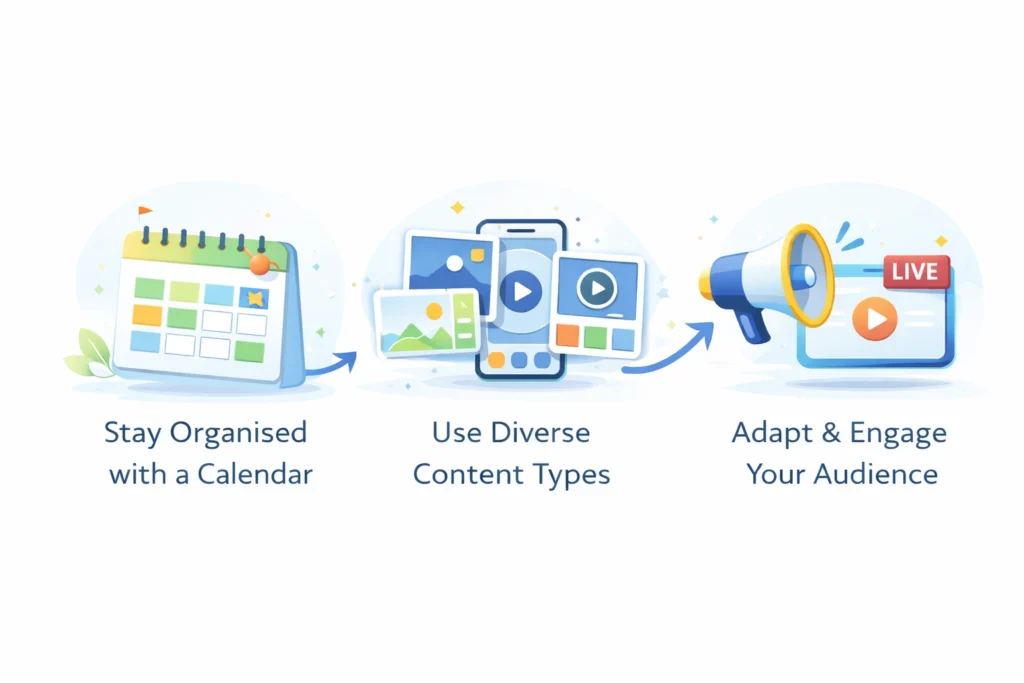
Create a Flexible Content Calendar
The schedule for content does not have to be complex; simply a spreadsheet or a paper planner is sufficient.
Plan your themes for the month. Jot down important dates and holidays and organise your content around these.
This will prevent you from getting bored and allow you to make sure that your brand’s story is consistent.
Keep in mind that “flexible” is the keyword here. You should be prepared to pivot when something new and exciting happens to come up.
Mix Up Your Content Formats
Don’t limit yourself to scheduling static images. You should plan to include a variety of types of content in your schedule. It could include carousels, Reels, Stories, and live video.
This keeps your audience entertained and also signals to the algorithm that you’re an active creator.
Final Thoughts
If you’ve gone through the motions on Instagram but are still waiting for the visibility you want for your site, it may require something else, and learning how to schedule posts on Instagram can make the difference.
Scheduling tools like HeyOcra assist you in taking control over your posts, ensuring the quality of your content, and publishing when you want to without feeling like you’re part of a race.
If you’re ready to stop speculating, stay steady, and succeed on Instagram, it’s the right time to begin scheduling your posts. In the future, your business (and your followers) will thank you.
Next Steps
Join a demo with 100 Pound Social to see how our affordable social media marketing and LinkedIn lead generation services can help you, from just £100 per month.